.png?width=109&height=94&name=PWH-4C%20(1).png "PWH-4C (1)")
Artificial Intelligence - Friend or Foe?
By: Jen O'Reilly
AI is everywhere—from headlines warning of world-changing disruption to everyday tools quietly making our jobs easier. The truth is that artificial intelligence isn’t here to replace us; it’s here to transform how we work. Over the past few months, I’ve explored AI through books, articles, classes, and hands-on practice. What I’ve learned is reassuring: most experts agree that AI won’t end humanity anytime soon. But change? That’s already happening.
Whether you’re just starting to explore AI or you’re already experimenting with new tools, this month’s article will help you discover practical ways to make AI work for you—so you can spend more time building relationships, meeting your sales goals, and delivering an exceptional customer experience.
Why Use AI?
The real value of using AI is to offload time-consuming, repetitive, and labor-intensive tasks—freeing you up to focus on the “human” side of sales: building relationships, engaging customers, and creating meaningful connections. Here are just a few of the ways AI can be used by Sales professionals:
Automate Routine Tasks: AI can handle repetitive activities such as drafting emails, data entry, summarizing meeting notes, and follow-up reminders, so you can focus on high-value conversations and closing deals.
Personalize Customer Engagement: AI analyzes customer data to help you craft more relevant, timely, and personalized outreach, demonstrating to customers that you understand what matters to them.
Gain Deeper Insights: AI tools can uncover actionable insights about your prospects, competitors, and existing customers, helping you prepare for meetings with a clearer understanding of customer needs and buying signals.
Scale Your Impact: AI enables you to manage more accounts, activities, and touchpoints without sacrificing quality, allowing you to reach more customers and grow your territory efficiently.
Ultimately, AI is a strategic advantage for sales professionals who want to spend less time on manual tasks and more time doing what matters most: building trust, solving problems, and driving growth. By embracing AI, you position yourself to stay ahead in a rapidly evolving sales landscape—delivering better results for your customers and your business.
So Many Options!
Which AI is the “best” one? The answer is that it depends on what you are looking to achieve. There are many options available, some free and some available for a fee. Below are some additional AI platforms available and what they are best used for:
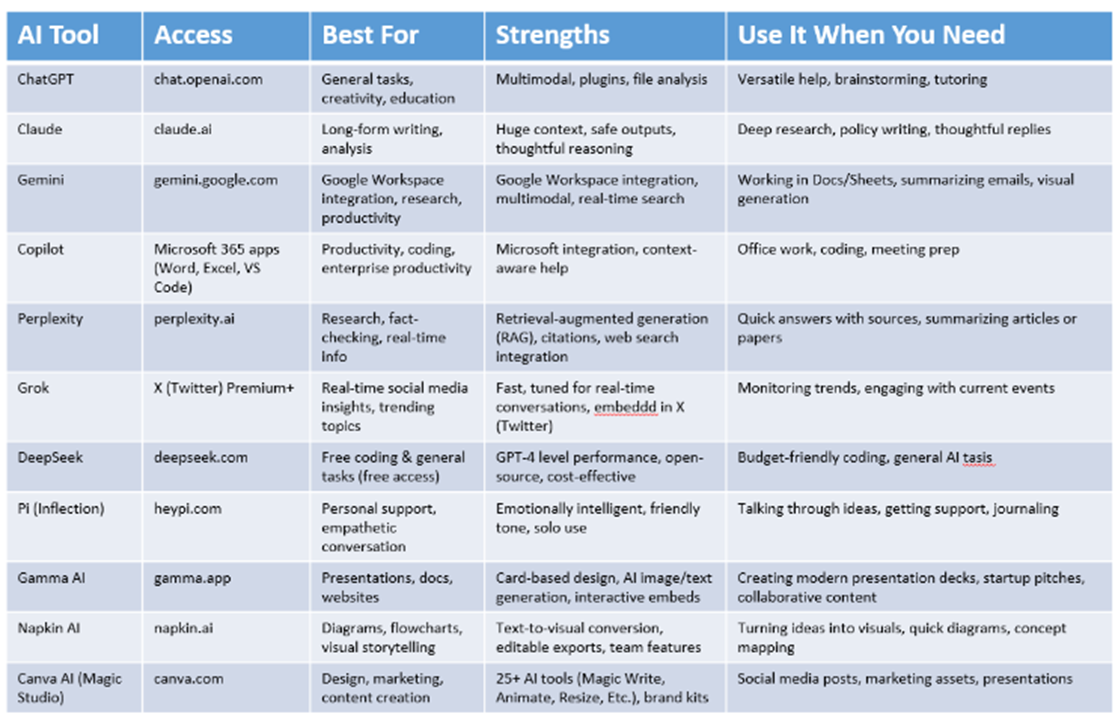
Learning How to Use AI
While there’s no shortage of classes, books, articles, and guides about artificial intelligence, the most effective way to truly learn AI is by rolling up your sleeves and practicing. Formal resources can provide valuable background and frameworks, but hands-on experience is what transforms knowledge into skill.
Why Practice Matters: AI is a rapidly evolving field, and the best way to build confidence is by experimenting with real tools and real tasks. Start by identifying a simple, repetitive workflow in your daily routine—such as drafting emails, summarizing meeting notes, or researching prospects—and try automating it with an AI platform like Copilot. As you see results, gradually expand to more complex use cases.
Remember: AI is not just a technical tool—it’s a practical partner in your daily work. The more you practice, the more you’ll discover how to make AI work for you, freeing up time for the “human” aspects of your role, like building relationships and delivering exceptional customer experiences.
Successful Prompts- Getting Started
When it comes to AI, the prompt is everything. Think of prompting as giving clear instructions to a helpful assistant—not just typing keywords like a search engine. The best prompts include four elements:
-
Role: Who should the AI “be” for this task?
-
Goal: What do you want to accomplish?
-
Context: What background or details are important?
-
Style: How should the response sound?
Example: “You are the best medical device sales leader that ever lived. Draft an email to your field sales team asking them to take action on a sales initiative for [XXX product], including [details]. Use a professional but approachable tone, and ask them to complete their prospecting activities by [date].”
After you get your first draft, review and refine your prompt for even better results. Pro Tip: Keep a log of your best prompts for quick reference, and don’t hesitate to ask AI to help you improve them!
Don’t Trust- Verify!
You may have heard that AI can “hallucinate.” But what does that mean exactly? AI hallucination happens when an artificial intelligence system confidently generates false or misleading information that sounds accurate but isn’t actually grounded in real data or facts. This isn’t just a technical glitch—it’s a real-world business risk.
AI models don’t “know” facts—they predict what sounds plausible based on patterns in their training data. If the data is incomplete or the prompt is not clear, the AI may fill in gaps with information that looks credible but is completely made up.
How to Spot and Prevent Hallucinations:
-
Always verify important outputs: Double-check facts, citations, and recommendations from AI tools before acting on them.
-
Use trusted sources: Anchor AI outputs to reliable data whenever possible.
-
Human review: Make it a habit to review AI-generated content, especially for customer-facing or high-importance tasks.
Data Privacy and Security
With AI tools handling more sensitive customer and business data than ever, data privacy and security are real concerns. Many AI platforms use your inputs—including chat history and uploaded files—to train their models, sometimes without explicit consent. This can expose confidential information to risks like data breaches, unauthorized access, or misuse by third parties.
Best Practices:
-
Share carefully: Avoid entering sensitive customer, personal, or business data into public or unapproved AI tools.
-
Choose enterprise-grade solutions: Use AI platforms that comply with privacy regulations and offer clear data handling policies.
The Verdict & Next Steps
The moral of the story is that AI can be a friend to the Sales professional if used correctly. Hopefully you learned more about how AI can work for you and are motivated to understand better how to put it to use. Here’s how to get started:
Identify Time-Consuming Tasks: Start by listing the routine tasks that take up most of your workday—such as drafting emails, researching prospects, or summarizing meetings. These are prime candidates for AI automation.
Start Small and Build Confidence: Pick a single workflow—like automating meeting notes or generating first drafts of sales emails—and use AI to streamline it in the next month. Review the results, refine your prompts, and gradually expand to other tasks as you become more comfortable.
Keep Learning: The more you read, practice, and learn about AI, the more effectively you can put it to use. If you want to learn more, check out this month’s Success Shelf book recommendation – The AI Edge. It’s written specifically for sales professionals who want to use AI to free up more time for selling and engaging with customers.